
 Profile
 Dashboard
 Logout
Table of contents
Key takeaways
- Real product demos tend to convert better when trust is part of the buying decision.
- CompleteGreet case examples show higher engagement, longer visits, and stronger booking or conversion results after adding real video.
- Most first time setups can go from signup to a live bubble in about 3 to 4 minutes.
What does the data show about AI generated product video vs real product demos?

A real product demo shows the actual item in use. Choose it when buyers need to inspect fit, scale or operation; the available customer examples do not establish a sales lift over AI video.
AI generated product videos are faster and cheaper to produce. A 90 second synthetic clip can be made in hours instead of weeks, which is why teams often try them for quick campaign tests.
Speed helps. It just does not replace trust.
When shoppers evaluate a purchase, they want proof that a real person has handled the product or stands behind the service. AI avatars can explain features, but synthetic voices and stiff movement can make viewers pause. Once someone starts wondering whether the presenter is real, the video is working against the sale.
Live demos also hold attention in a more useful way. A founder or team member can show the product, answer the obvious objection, and make the brand feel reachable. One person. One take. No studio polish needed.
Generated video still has a place. It can help with early awareness, quick variants, or large catalogs where manual production is unrealistic. When the goal is to close the sale on a product page, pricing page, or lead page, a real demonstration is usually the stronger trust signal.
Why does this matter for your bottom line?
The choice between AI generated product videos and real product demos affects revenue because it changes how much the visitor trusts what they are seeing. AI footage can explain a feature. A real demo can show who is behind the product.
CompleteGreet’s customer examples show website implementations. They do not establish a controlled comparison between real product demos and AI-generated video, or a dependable conversion benchmark.
Separate a hypothetical revenue calculation from a measured customer result, and include costs when assessing profit.
From engagement to actual revenue
As a hypothetical scenario, a 17% relative conversion lift on $10,000 monthly revenue would add $1,700 a month, or $5,100 over a quarter, only if traffic and average order value stayed constant. This is arithmetic, not a forecast for recording a demo. Production and subscription costs still need to be deducted when assessing profit.
For an appointment business, count completed bookings and their contribution to profit. Video views and enquiries alone do not establish a financial return.
Baymard Institute research on checkout usability often focuses on trust near the point of purchase. Real product demos work in a similar way. They give the visitor a human signal before asking for a click, form fill, booking, or payment.
Setup timing matters too. A real demo can take 15 minutes to record and under 5 minutes to publish with CompleteGreet. Waiting for a polished production can cost more than it saves.
How to set up your first video greeting in under 5 minutes
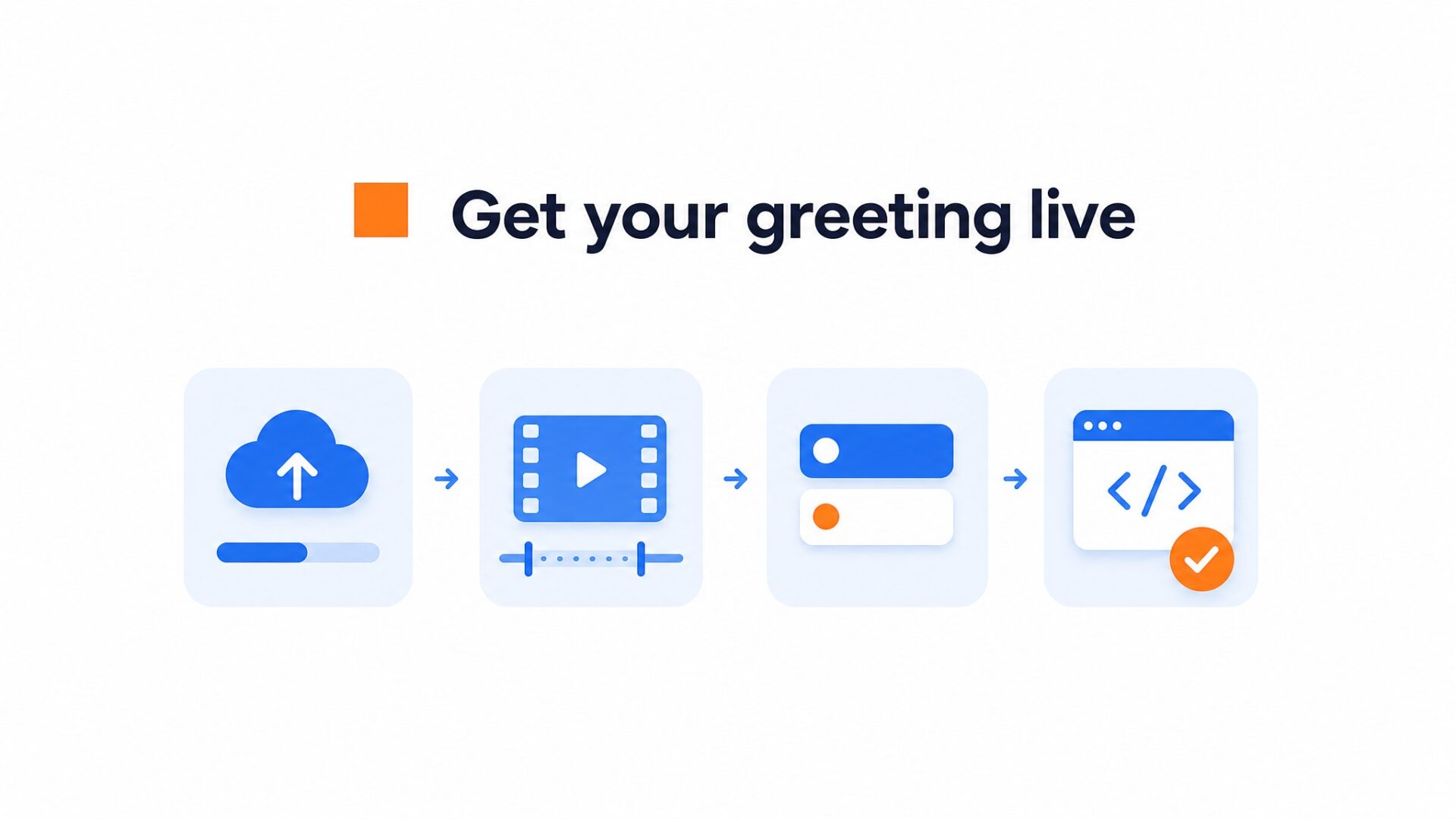
Most first time setups finish in about 3 to 4 minutes from signup to a live bubble. The dashboard keeps the upload, trim, button choice, and install step in one flow.
Script and recording tips
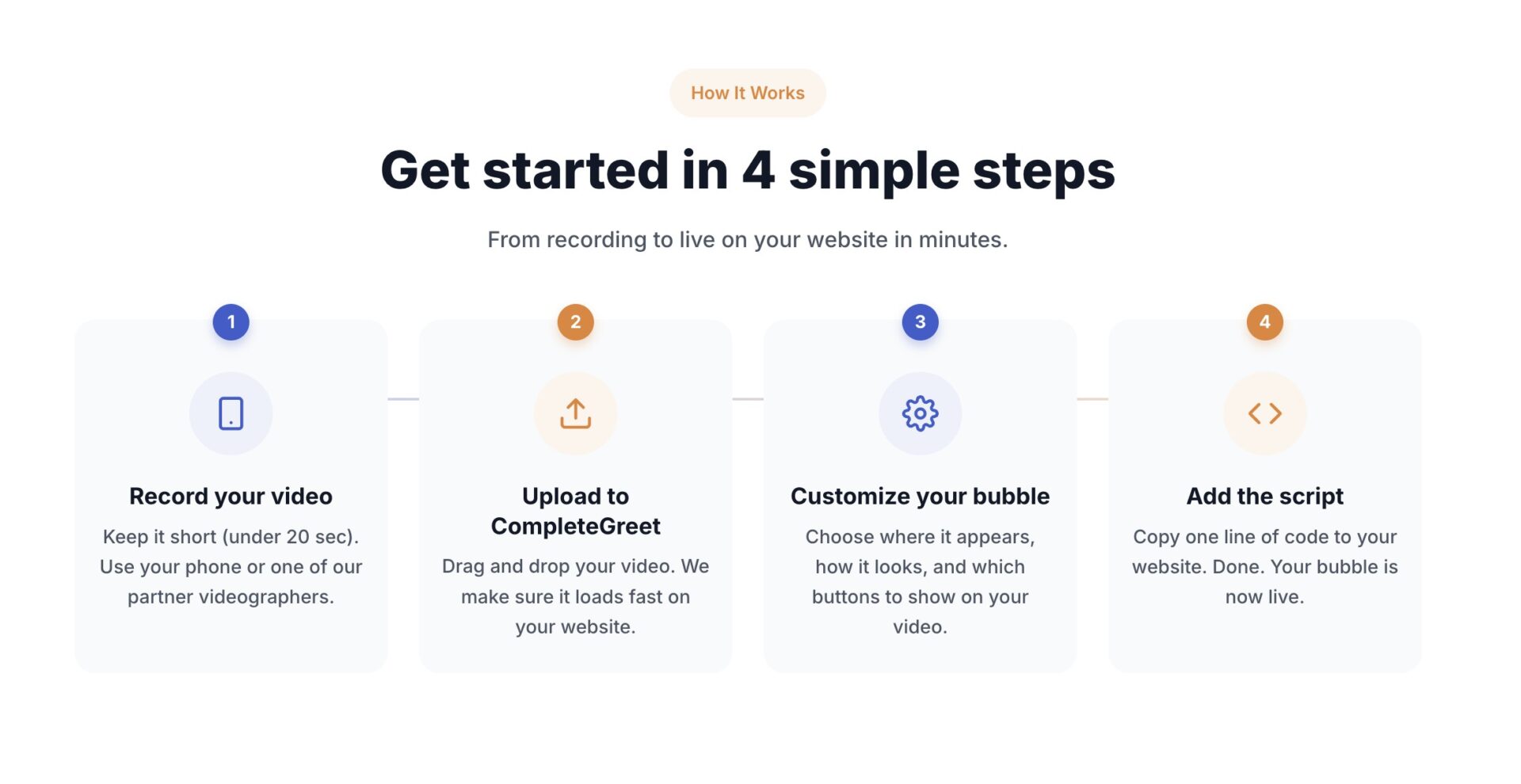
Record your greeting before you open the dashboard. A 20 to 30 second clip works best. State your name, your role, and one specific next step you want the visitor to take. Good audio matters more than resolution. A quiet room and a phone microphone beat a DSLR in an echoing office.
Questions often pull more clicks than statements. “Are you looking for a pricing plan that fits a team under ten people?” is more direct than “We offer flexible pricing.”
Upload the file or import it from Instagram or Facebook. CompleteGreet compresses the video automatically so the page stays lightweight.
Place the bubble on your homepage or pricing page first. Those two pages tend to have stronger intent than a random blog post. Avoid checkout pages unless you have a specific reason to add video there.
One setup detail to watch: the default bubble position is bottom right, which can overlap chat widgets on many Shopify and WordPress themes. Move it to bottom left if another widget already sits there.
Set one clickable action. Options include a booking link, a contact form, or a product page. When teams add too many buttons, the visitor has to think harder. One clear next step is usually better.
Install the script by copying one line into your site header. WordPress users can use the plugin. Shopify users can use the app or add the snippet through the theme customizer. Squarespace and Wix both support custom code areas. No developer needed.
Reading your analytics
Use views, clicks and completed actions to review the greeting. Compare results by device and with your baseline; the available evidence does not establish a healthy play-rate range or a fixed time to judge the result.
Completion rate can show where viewers leave, but it does not prove the script is effective. Review it alongside completed enquiries or purchases and the actual recording.
CompleteGreet BUILD is $29 per month when billed yearly, or $36 month to month, for 5,000 unique visitors per month, 1 website, and 2 bubbles or videos. Every plan includes a 30 day free trial. No credit card required. Compare plans if you expect more traffic.
Teams with the highest engagement often record videos on a phone in natural light instead of using studio equipment. A real face usually does more for trust than a perfect set.
Online sellers increasingly ask whether an AI generated clip can replace a real person demonstrating a product. The answer depends on the job the video has to do.
If you need quick variants for awareness campaigns, AI generated video can help. If the visitor is already comparing options and deciding whether to buy, real video gives the page a stronger human signal.
Trust signals that synthetic video misses
Real product demos carry small cues that shoppers notice: natural speech, eye contact, a real hand using the product, and the sense that someone is accountable for what is being sold.
AI generated avatars can deliver a clean script, but clean is not always more persuasive. If the buyer is already skeptical, synthetic presentation can make the page feel less personal.
Where automated clips fit in the funnel
Automated clips work best for early awareness, quick testing, or very large product catalogs. When a shopper is on a product page and ready to decide, a real face answering common questions is usually more useful than a generic rendered sequence.
Measuring the difference on your site
Track play rate, completion rate, clicks, bookings, and conversions before you judge the format. CompleteGreet pricing starts at 29 dollars per month when billed yearly, which keeps real demos within reach for stores already spending money on ads.
AI generated video remains useful in narrow cases, especially when scale matters more than personal trust. Most small stores and service businesses get more value from showing the real person behind the offer.
A real product demo from CompleteGreet gives visitors a clearer trust signal without requiring a production studio. Stores can start with the BUILD plan at 29 dollars per month when billed yearly and scale as visitor volume grows.
Common questions
How much does CompleteGreet cost for a small business getting 5,000 visitors a month?
CompleteGreet BUILD is $29 per month when billed yearly, or $36 month to month, for 5,000 unique visitors per month, 1 website, and 2 bubbles or videos. That covers many small ecommerce stores and service sites. Unlike tools that charge per video play, the price stays flat no matter how many times someone watches the greeting.
Do real product demos sell more than AI generated product videos?
Use a real demo when showing the actual product matters. AI video can help illustrate an idea, but the available evidence does not establish that either format sells better for every audience.
How long does it take to set up a video greeting on a website?
Most teams finish setup in under five minutes. CompleteGreet works on Shopify, WordPress, Wix, Squarespace, Webflow, WooCommerce, custom HTML, React, and Vue. Paste the snippet, upload a short clip, and set the bubble placement. The widget loads without blocking the page.
What should I say in a product demo video to get more sales?
Keep it under sixty seconds. Show the product in use within the first ten seconds. Mention one specific outcome the buyer gets, not just features. End with a clear next step. Pricing pages and product detail pages often work best because visitors there already have purchase intent.
Can CompleteGreet handle 10,000 unique visitors per month?
Yes. The GROWTH plan covers 10,000 unique visitors per month for $59 when billed yearly, or $74 month to month, with 1 website and 5 bubbles or videos. If traffic grows further, EXPAND handles 30,000 visitors. Every plan bills by unique visitors, not plays, so replays do not trigger overages.
Which platforms does CompleteGreet support?
CompleteGreet supports Shopify, WordPress, Wix, Squarespace, Webflow, WooCommerce, custom HTML, React, and Vue. Installation is a single code snippet on most platforms, with app or plugin options for supported stores and sites. The bubble stays where you place it across mobile and desktop.
Is CompleteGreet meant for product demos or customer support?
Trust and greetings are its focus, not full support workflows. CompleteGreet works well on landing pages, pricing pages, and product detail pages. Teams running complex ticket systems will still want a dedicated support tool. For converting browsers into buyers, real video bubbles are the better fit.
What measurable results can I expect from adding a real video demo to my site?
Track your own plays, completed views, product clicks and purchases. A comparison with an equivalent group is needed to estimate the video’s effect; the customer examples do not supply an expected lift.



