
 Profile
 Dashboard
 Logout
Table of contents
Key takeaways
- CompleteGreet charges a flat monthly rate based on how many unique visitors hit your site.
- Loom is a screen recording tool that happens to embed on websites.
- CompleteGreet takes about five minutes on most sites.
How does CompleteGreet compare to Loom for Website Video on pricing?
CompleteGreet charges a flat monthly rate based on how many unique visitors hit your site. Loom charges per user seat, which means your bill multiplies by every person who needs to record or manage videos.
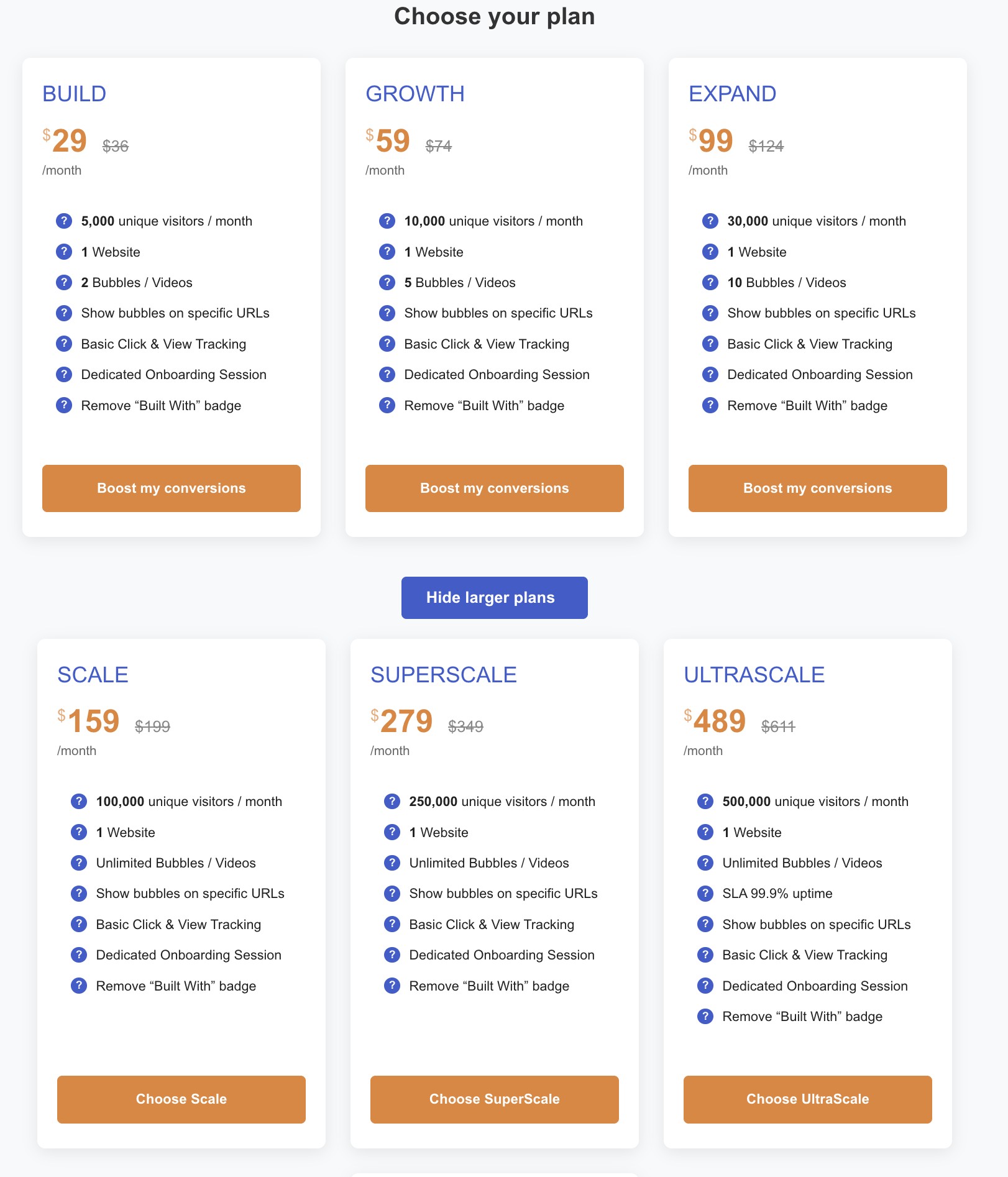
CompleteGreet BUILD costs $29 per month when billed yearly, or $36 month to month. That covers 5,000 unique visitors, one website, and two video bubbles. It does not matter whether one person or ten people manage the dashboard. The price stays flat.
Loom Business lists at $18 per user per month on monthly billing. A three person team pays $54 per month. Business + AI jumps to $24 per user per month, pushing that same team to $72 monthly. Annual billing can lower those monthly equivalents to about $15 for Business and $20 for Business + AI, but the per seat math never disappears.
The pricing models reflect fundamentally different purposes.
Loom is built for internal video messaging: screen recordings, team updates, async feedback. It is a communication tool first. CompleteGreet is built for website video widgets: greeting visitors, reducing bounce rates, capturing leads. It is a conversion tool first.
For a small business adding video to their homepage or checkout flow, Loom’s per user pricing forces a choice between limiting access or eating a growing subscription bill. CompleteGreet’s visitor based pricing lets the whole team collaborate without changing the bill every time someone new needs to upload a greeting video.
Loom’s free Starter plan caps you at 25 videos and 5 minutes per recording with Loom branding on every clip. That works for testing internal messages, but it breaks down for public facing website widgets where you want unlimited plays, custom branding, and no platform watermarks.
Most teams evaluating website video widgets are better served by a tool that prices based on audience size, not headcount. CompleteGreet’s flat rate is easier to predict, especially as teams grow.
Which one is better for website trust and lead generation?
CompleteGreet is built for this exact job. Loom is a screen recording tool that happens to embed on websites.
That distinction matters more than most buyers realize. Loom records your screen or camera and gives you a shareable link. Embedding that recording on your site works for basic explainers, but the player is built for async messaging, not website conversion. Visitors can watch the video, but the self serve plans focus on viewer and engagement insights rather than a website conversion dashboard with forms, booking, and page based actions.
CompleteGreet counts by unique visitors only, not by how many times someone hits play. The widget sits in the corner, follows the visitor, and can fire different videos based on the page or traffic source. More importantly, it includes form capture, calendar booking, and direct calls to action inside the video player itself.
The useful distinction is the workflow: a website greeting can provide a next action alongside the message. The customer examples do not establish a typical uplift or a controlled comparison with Loom.
Loom works for simple welcome messages if you already pay for the platform. But the tool is not purpose built for website lead generation. Its embed workflow is still centered on individual recordings. Removing branding requires a Business plan or higher, and Salesforce integration is listed for Enterprise rather than the self serve website embed flow.
NNGroup’s video usability guidance is more modest: video helps when visitors can find it, understand it, and control it. For a lead generation page, the next step matters as much as the video itself.
If the goal is a permanent website greeting, a dedicated widget usually avoids extra setup work. CompleteGreet is the better default for a site that needs to turn visitors into leads.
Which one is easier to set up?
CompleteGreet takes about five minutes on most sites. The WordPress plugin installs with one click from the admin panel, the Shopify app adds itself to your theme automatically, and custom sites just need a single script tag pasted into the header.
Loom requires a different workflow. You record the video in their desktop or browser app first, then copy an embed code and paste it into each page where you want it to appear. If you need to update the greeting later, you record again and replace the embed.
The practical difference shows up when you manage multiple pages. CompleteGreet lets you change a video from the dashboard and have it update everywhere instantly. Loom treats each embed as a separate instance that you must edit individually.
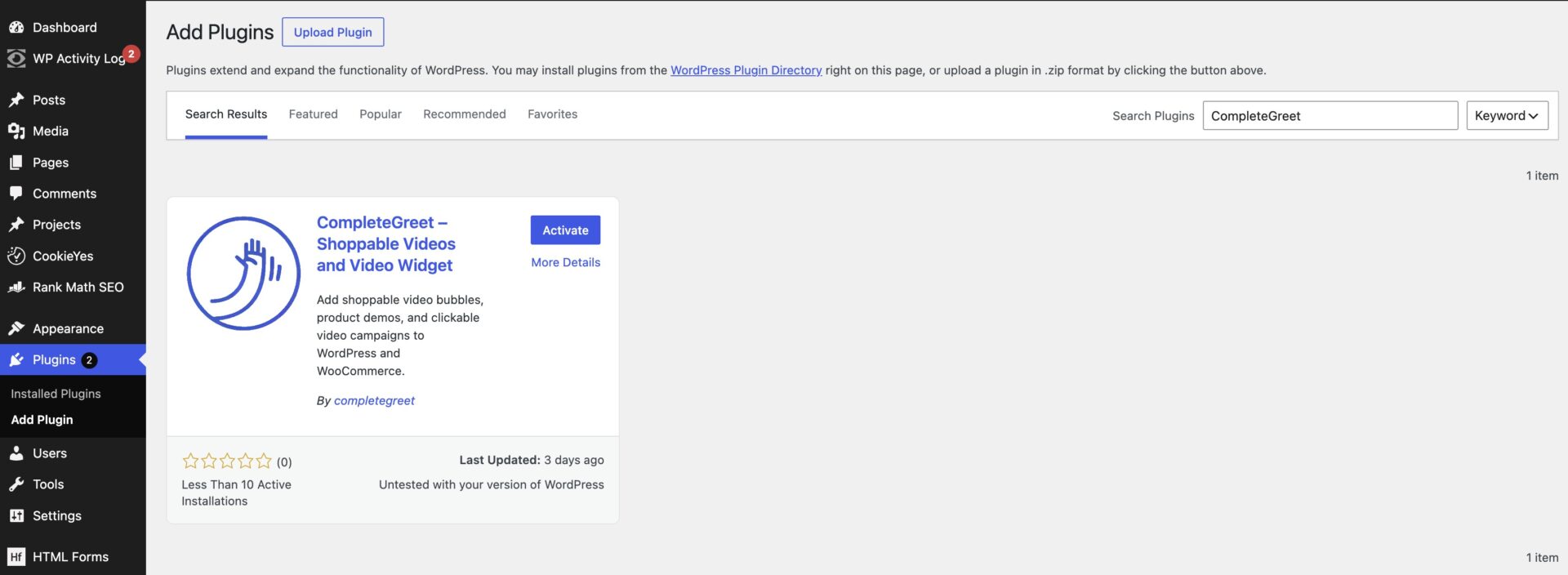
CompleteGreet supports every major platform.
That includes Shopify, WooCommerce, WordPress, Wix, Squarespace, Webflow, Magento, and custom HTML or JavaScript sites. The same dashboard controls widgets across all your properties, so a marketing team running three different stores does not need three different workflows.
Loom works on any site that accepts HTML embeds, but it is built for recording and sharing clips, not for permanent website presence. Teams using it as a persistent greeting have to manage each embed manually, which adds friction when pages, branding, or messages change.
For most businesses, CompleteGreet is the simpler default. It was built for website use, updates centrally, and removes most technical decisions about where to place code.
The verdict: who should choose which?
CompleteGreet is the better fit for a business that wants a reliable way to build trust and convert website visitors into inquiries or sales. The flat pricing model counts unique visitors only, so the cost stays predictable no matter how many times someone watches your greeting. Most teams get their first bubble live in under five minutes, and it works on every major platform from WordPress to Shopify to Webflow without custom code.
Loom for Website Video only makes sense if your entire workflow already lives inside the Loom ecosystem. If your sales team records every demo with Loom, stores everything in Loom workspaces, and already pays for Loom Enterprise, adding a website widget might feel like a natural extension. But that is a narrow fit, not a broad recommendation.
The deeper problem with Loom’s website video approach is that billing is tied to paid creator seats, not website traffic. That can work for internal communication, but it is a poor match when you are budgeting for a public site widget.
CompleteGreet avoids this entirely.
CompleteGreet BUILD is $29 per month when billed yearly, or $36 month to month, for 5,000 unique visitors per month, 1 website, and 2 bubbles or videos. That includes everything. No overage fees when someone watches your greeting three times. No surprise bills when traffic spikes during a product launch.
Judge the website greeting by completed enquiries and the screen recording by the communication task it serves. The available evidence does not establish that either format converts better.
If you need async video messaging for internal team communication, Loom remains a solid choice. For turning website visitors into booked calls and qualified leads, CompleteGreet is the better default.
Choosing between CompleteGreet and Loom for Website Video comes down to the job you need the video to do. CompleteGreet is a dedicated website video widget. Loom is a screen recording and async video tool that also lets you embed recordings on a webpage.
Loom publishes general embed instructions and paid plan details, but it does not publish a separate website greeting widget plan. The comparison is really about whether you need a persistent site widget or a shareable video embed.
| Feature | CompleteGreet | Loom for Website Video |
|---|---|---|
| Primary use case | Website trust, lead generation, and personal first impressions | Screen recordings, async video messages, and embeddable recordings |
| Pricing model | Flat pricing based on unique visitors per month. No pricing per video play. | Per paid creator or admin on Business and Business + AI |
| Starting price | CompleteGreet BUILD is $29 per month when billed yearly, or $36 month to month, for 5,000 unique visitors per month, 1 website, and 2 bubbles or videos. | Business is $18 per user per month on monthly billing. Business + AI is $24 per user per month. |
| Setup time | Under 5 minutes for most sites | Record a Loom, copy the embed code, and paste it into an HTML block or page editor. |
| Platform support | Shopify, WordPress, Wix, Squarespace, Webflow, custom HTML, React, and Vue | Any site or app that supports iframe embeds, plus listed integrations such as Notion and FigJam embeds. |
| Video type | Unobtrusive video bubble that visitors choose to open | Embedded Loom recording or share page video |
| Best for | Most websites that want a simple trust building video widget | Teams that already use Loom for screen recordings and async updates |
| Main limitation | It is built for trust building greetings, not focused on surveys first or heavy chat workflows. | It is not a dedicated website greeting widget with built in forms, booking, page targeting, or visitor based widget controls. |
CompleteGreet uses flat pricing based on unique monthly visitors rather than video play counts. The BUILD plan handles 5,000 unique visitors for $29 per month when billed yearly, or $36 month to month, covering one website and up to two video bubbles.
Most sites finish active setup in under 5 minutes.
To compare the tools, use the same audience, message and next step where possible. Report visitor counts, completed actions and the comparison period rather than borrowing a general uplift figure.
Loom for Website Video functions differently as an extension of screen recording technology, which suits teams already using that ecosystem for asynchronous communication. The platform does not publish specific website widget pricing or visitor limits in accessible public materials.
CompleteGreet suits teams that need a standalone trust building layer with predictable costs and fast deployment. The flat rate per visitor count eliminates guesswork about overage fees during high traffic periods.
Teams should choose CompleteGreet when the priority is a simple, unobtrusive video bubble that loads reliably across major platforms without heavy customization. Loom fits narrow use cases where screen recording workflows already dominate the content strategy. CompleteGreet handles 5,000 monthly visitors for $29 per month when billed yearly.
Common questions
How much does CompleteGreet cost compared to Loom for Website Video?
CompleteGreet BUILD is $29 per month when billed yearly, or $36 month to month, for 5,000 unique visitors. Loom Business is $18 per user per month on monthly billing, so a three person team pays $54 monthly. CompleteGreet pricing stays flat regardless of how many team members record videos. Loom charges per paid creator or admin, which can multiply as the team grows.
What is the difference between CompleteGreet and Loom for Website Video?
CompleteGreet displays a video greeting automatically when someone visits your site. Loom for Website Video is a screen recorder for sending async messages to specific people. CompleteGreet is built for website trust and lead capture. Loom is built for explaining things to colleagues or clients through shared links. They solve completely different problems.
Which is easier to set up, CompleteGreet or Loom for Website Video?
CompleteGreet takes under five minutes on most platforms. Paste the embed code once and the greeting appears on every page you choose. Loom for Website Video requires installing a desktop app or browser extension, recording a video, then manually embedding each video link where you want it. CompleteGreet is faster for ongoing website use.
Can I use Loom for Website Video to greet website visitors automatically?
Not in the same way. Loom gives you share links and embed codes after you record. You can place an embedded player on a page, but it is not a floating greeting widget with bubble positioning, form capture, booking buttons, or visitor based controls. Loom is the wrong tool for automated website greetings.
Which platform should I choose for lead generation, CompleteGreet or Loom for Website Video?
Consider CompleteGreet for a greeting with contact or booking actions. Loom can explain a process through a recording. Select the workflow you need, then measure its effect instead of assuming a lead-generation advantage.
Does CompleteGreet work on Shopify and WordPress like Loom for Website Video?
CompleteGreet works on Shopify, WordPress, Wix, Squarespace, Webflow, WooCommerce, custom HTML, React, and Vue. Loom for Website Video videos can be embedded on any page that accepts iframe embeds, but it is not a native widget for those platforms. CompleteGreet has dedicated plugins and installation guides for each major platform. Loom relies on generic embed codes that need manual placement.
When should I use Loom for Website Video instead of CompleteGreet?
Use Loom for Website Video when you need to record your screen to explain a process to a specific person or team. It is great for async demos, bug reports, and internal training. CompleteGreet is built for trust and greetings, not for survey workflows or detailed screen recordings. Loom is better for one to one explanations. CompleteGreet is better for website conversion.



