
 Profile
 Dashboard
 Logout
Table of contents
Key takeaways
- Plan video content in quarterly cycles around your busiest periods. Give each video a specific page, visitor question and action to support.
- A year long video plan turns random content into a conversion asset.
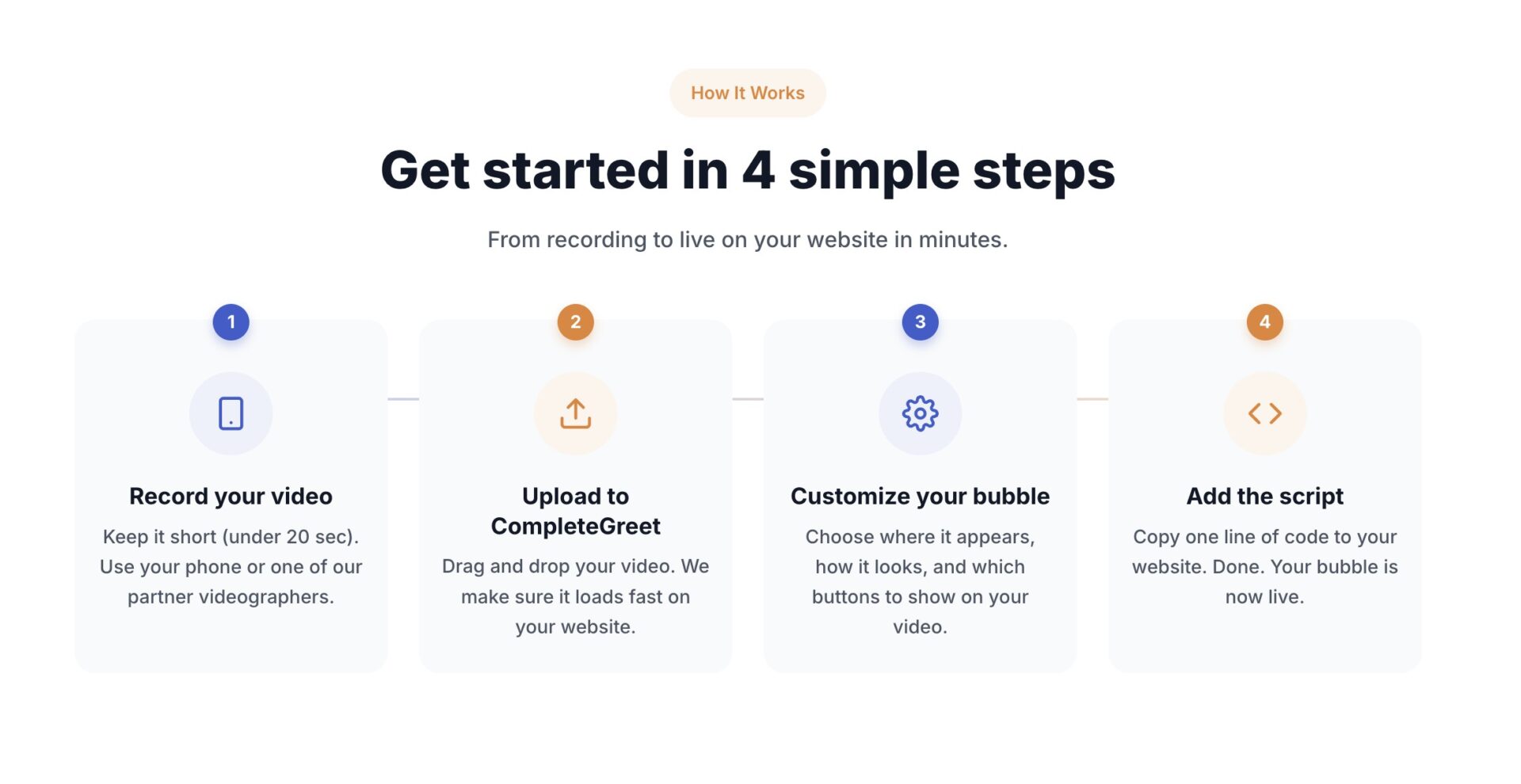
- Record a short video on your phone, upload it to the dashboard, and add the CompleteGreet script to your website header.
How to Plan a Full Year of Video Content for Your Website
Plan your video content in quarterly cycles around your busiest business periods. Start with the pages where visitors most often need reassurance or a clear next step.
For many small business websites, 6 to 10 core videos can cover a full year.
That sounds like a lot until you break it down. Two welcome videos for your homepage and about page, three product or service explainers, two seasonal promotions, two customer testimonials, and one FAQ video covers nearly every touchpoint a visitor encounters. Batching them into one or two recording sessions makes the calendar easier to manage.
Start with the pages that get the most traffic.
Your homepage video should explain what you do, who you serve and the next step. A pricing-page video can address cost and commitment. See customer website examples for implementations, not booking benchmarks.
Batch your production.
Recording several videos in one session avoids repeating the same setup work on separate days. Set up your lighting once and work through a quarter’s worth of scripts while everything is ready. Store raw footage in dated folders and keep a running list of scripts on your phone so you are never starting from a blank page.
Map videos to visitor intent.
First time visitors need different content than returning customers. For new visitors, try trust builders like founder stories and customer testimonials. For returning visitors, try product explanations, comparison guides, and clear next steps. CompleteGreet lets you place different videos on specific URLs. The BUILD plan is currently $29 per month when billed yearly and includes 2 bubbles or videos. GROWTH is $59 per month when billed yearly and includes 5.
Schedule a monthly review to check which videos are being watched and which are being skipped. If viewers regularly stop early, shorten the video or move the main point closer to the start. Refresh seasonal content before the holiday or event, not on the day itself. A content calendar that sits untouched for 11 months is almost as bad as having no plan at all.
Why a yearly video plan matters to your bottom line
A year-long plan helps you organize production and keep information current. Its value still needs to be measured through useful enquiries or purchases; the available examples do not establish an average uplift.
That’s not a vanity metric.
More qualified enquiries can create pipeline, but views and longer sessions do not establish that result. Review completed actions alongside recording and subscription costs each quarter.
Planning also protects your production budget.
Rushed video shoots can add rescheduling, script rewrites, and unnecessary editing work. Batch recording in January for Q1 and Q2 content spreads the setup work across six months of output. It also gives you time to edit before the next campaign launches.
The businesses that skip annual planning can end up with dead months and confused messaging. Video that sits unused because it did not fit the moment is money you cannot recover.
How to set up your first video greeting
Record a short video on your phone, upload it to the dashboard, and add the CompleteGreet script to your website header. That is the full setup loop.
Most teams overthink the script. CompleteGreet’s current setup guide recommends keeping the recording under 20 seconds. Introduce yourself by name, mention the one problem you solve for visitors, and tell them what to do next. Nielsen Norman Group recommends making online videos as short as possible, starting strong, and cutting unnecessary introductions.
Where to place the widget
Start with the bottom right corner on desktop, then move the bubble if it overlaps another important element. On mobile, test both sides and choose the position that stays clear of menus, chat buttons, and checkout controls.
A practical starting point is a 3 second delay on desktop and a 5 second delay on mobile. Test the timing on your own pages, and make sure the bubble never overlaps your checkout button or mobile menu.
Test the placement across your highest traffic pages. Pricing and contact pages are useful starting points because visitors are already considering a next step. Blog posts and documentation pages may need a less prominent placement.
What to say in your greeting
Open with your name and role. State the specific outcome you deliver in plain language. End with a single clear action: book a call, send a message, or browse products. Avoid vague phrases like “reach out anytime” which give visitors permission to do nothing.
Record in a quiet space with the camera at eye level. Natural window light is often enough. CompleteGreet automatically compresses uploaded videos to reduce file size while keeping the picture clear.
How to measure results
Watch views, full views, average watch time, and form submissions in the CompleteGreet analytics dashboard. If few visitors open the video, test the thumbnail or opening frame. If viewers stop early, shorten the video or bring the main point forward.
The available customer examples do not establish a typical enquiry or conversion lift. Use your own visitor and completed-action counts to decide which videos deserve the next production slot.
Compare plans to find the right fit for your traffic. CompleteGreet BUILD currently covers 5,000 unique visitors per month, 1 website, and 2 bubbles or videos for $29 per month when billed yearly.
A yearly video plan also needs a realistic budget and regular review dates.
The practical framework is simple: choose the important pages, record the videos in batches, and review the results every quarter.
For a site with up to 5,000 unique visitors per month, CompleteGreet BUILD currently costs $29 per month when billed yearly or $36 on a month to month basis. It includes 1 website, 2 bubbles or videos, and basic click and view tracking.
Choose your video count by page priority rather than a fixed visitor formula. Start with the homepage and the pages where visitors make a decision, then add seasonal or service specific videos when there is a clear reason.
Review the content and technical performance every quarter. Check that videos still match the page, links and buttons still work, and the page continues to meet Google’s Core Web Vitals guidance.
The pricing page lists a 20% saving with yearly billing. At the current yearly rate, BUILD costs $348 for 12 months.
Start with the 2 included video slots and expand after you have enough viewing and conversion data to judge what is working.
Common questions
How far in advance should I plan video content for my website?
Plan your video content quarterly rather than trying to map out all 12 months at once. Business priorities shift. Customer questions change. A 90 day plan gives you direction while leaving room for adjustments. Quarterly planning can make consistent publishing easier than trying to lock every detail for the full year.
How many videos do I need for a full year of website content?
For many small business websites, 6 to 10 core videos can cover a full year. One homepage greeting, one for pricing, one for each major service, and a few seasonal updates. The goal is relevance, not volume. Start with one well placed video on your highest traffic page before adding a dozen scattered clips.
Can I use the same video greeting on multiple pages?
You can, but a page specific greeting may feel more relevant. A generic hello works on any page. A video that references the exact content, such as pricing questions on the pricing page, speaks to what the visitor is considering at that moment.
How much time does it take to create a month of website video content?
Set aside one focused afternoon per month. A workable split is 30 minutes for scripts, 60 minutes for recording, and the remaining time for editing and uploads. Adjust the schedule to match the number and complexity of the videos.
How do I measure if my video content is actually working?
Use the CompleteGreet dashboard to compare views, full views, average watch time, button clicks, and form submissions. Compare those numbers with the page’s inquiries or bookings before and after the video goes live. That tells you more than raw view counts alone.
What is the fastest way to start with video content if I have nothing yet?
Record one short homepage greeting, upload it, and add the CompleteGreet script to your site. CompleteGreet currently recommends keeping the recording under 20 seconds. BUILD is $29 per month when billed yearly, or $36 month to month, for 5,000 unique visitors. The official setup guide says you can go from recording to live on your website in minutes.
What is the biggest mistake businesses make when planning video content?
Planning too much before recording anything. Teams spend weeks scripting elaborate series while their site stays static. The fix is to publish your first video this week, then iterate. A simple, useful video on your site gives you real feedback. Start there and improve it based on what viewers actually respond to.



