Profile
 Dashboard
 Logout
Table of contents
What matters here
- A founder video can make a waitlist page feel less anonymous and give visitors a clearer reason to sign up.
- An async embed and delayed media loading reduce performance risk, but you still need to measure the real page.
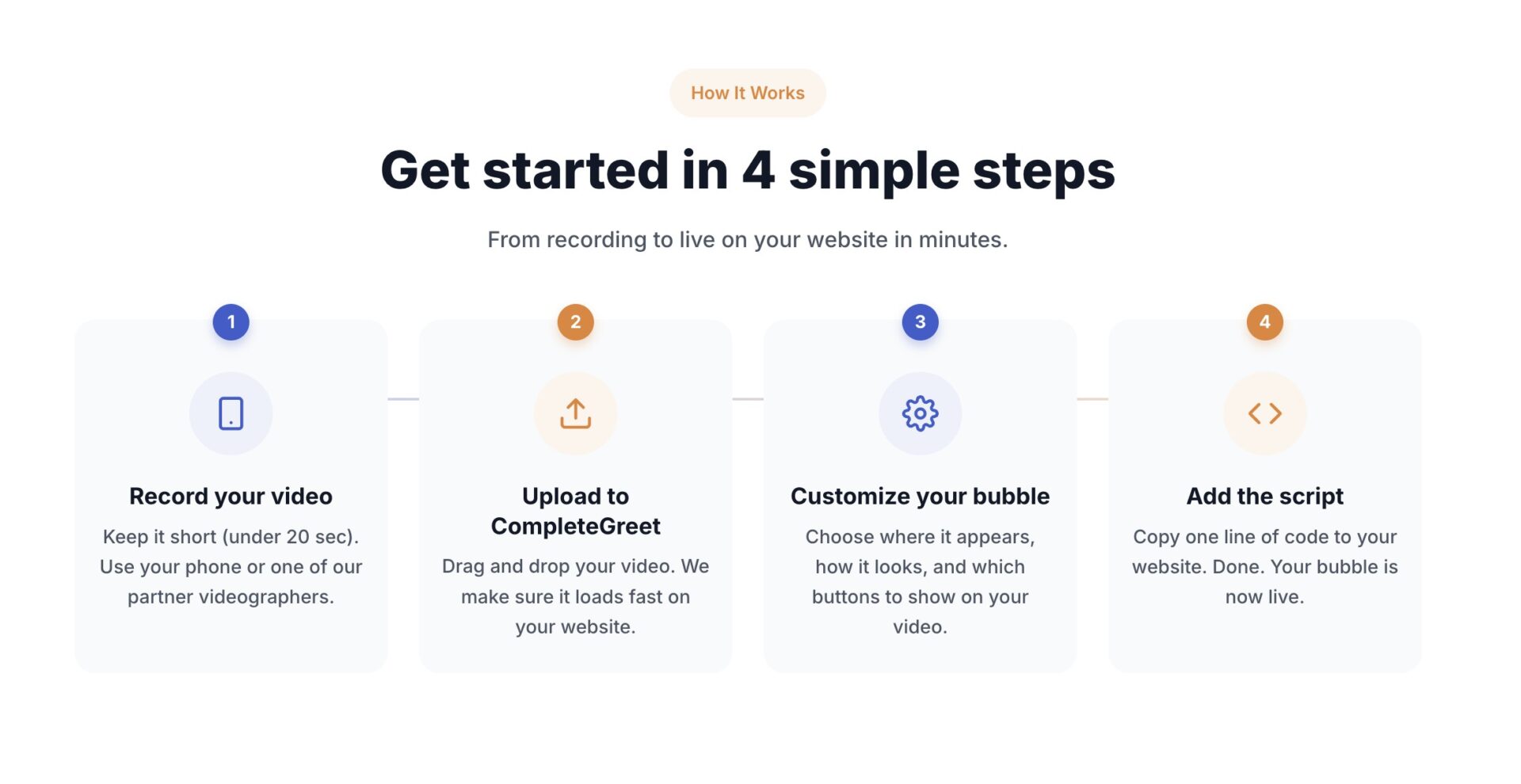
- Once the video is recorded, upload it, choose the page and action, then install CompleteGreet with the app, plugin, or script.
How to Build a Waitlist Faster With a Founder Video
A founder video can make a waitlist page feel less anonymous, but CompleteGreet does not have published waitlist specific test data. Its public cases show results from different customer sites, not a guaranteed waitlist lift.

The idea is simple. A waitlist asks visitors to trade attention for future access, and a blank form gives little context. A short founder video can answer two useful questions: who is behind this, and what do I get by joining? CompleteGreet currently recommends keeping a greeting under 20 seconds, which forces you to focus on the reason to sign up.
What the founder should actually say
Keep the script to three parts. Name the problem the product solves, show the product working, and state exactly what the first waitlist members get. The last part matters most: an early access tier, a launch discount, or a reserved slot. Specificity gives visitors a clear reason to sign up.
Place the bubble where it stays visible without covering the signup form. Pair it with one clear email capture path so visitors do not have to hunt for the next step. CompleteGreet supports custom forms and can send captured leads to Klaviyo.

Treat the video and form as one test. Track how often visitors open the greeting and how often they complete the signup, then compare that with the page before the video was added.
Does the widget actually affect page speed scores?
Short answer: careful loading reduces the risk, but no widget can promise an unchanged Core Web Vitals score on every site. The page still needs a before and after test.

CompleteGreet’s embed script loads asynchronously. The browser can keep parsing the page while the script downloads, which avoids a parser blocking fetch. The script can still use network and processing time when it runs, so async loading helps without guaranteeing a flat score.
LCP is one of Google’s three Core Web Vitals. Google defines a good LCP as 2.5 seconds or less for at least 75% of page visits. LCP measures when the largest image, text block, or video in the viewport is rendered, and third party code is only one of several things that can affect it.
The video file matters too. CompleteGreet compresses uploaded videos and delays the main video until interaction is detected or likely. That reduces initial work, but the result still depends on the rest of the page.
Async loading alone does not remove every cost. If a widget fetches large media too early, it can still compete with the page for bandwidth and processing time. Delaying the main video until interaction is near keeps that work away from the first moments of the page load.
Google recommends async or deferred loading for third party scripts and delayed loading for nonessential content. It also warns that JavaScript can still delay LCP after downloading, so loading method alone is not proof of performance.

Run PageSpeed Insights before and after installation, and use real user data when the page has enough traffic. If performance gets worse, inspect the actual LCP element and network work before deciding what caused it.
How to set up your first video greeting
Once the recording is ready, upload it, choose the page and action, and install the widget. The exact time depends on the platform and whether the site already has an app or plugin connection.
What to say
Keep the video under 20 seconds. Skip the long monologue.
Say your name, state what you do, then answer the one question a visitor on that page is most likely asking. On a pricing page, that question is about what happens after they pay. On a contact page, it’s about response time.
End with a single action. Start a free trial, book a call, or ask a question. One tap. Not three.
Where to put it
The bottom right corner is a sensible starting point on desktop. Check that it does not cover the signup form, cookie controls, or other important buttons.
Show it only where the greeting supports the main action. CompleteGreet page targeting lets you choose the relevant URLs instead of showing the same message everywhere.
How to measure it
Watch the relevant numbers in the dashboard: opens, clicks, forms, bookings, and the conversion connected to your waitlist goal.
Do not use the public case results as a waitlist forecast. Compare the signup rate before and after the founder video on your own page.
If opens are high and signups are flat, review the message, offer, placement, and form. The numbers tell you where to look, but they do not prove one cause on their own.
CompleteGreet’s public cases cover six customer sites. They are useful examples, but they are not waitlist experiments.
The cases cover different businesses and use cases. Their listing does not substantiate a numerical outcome or a combined average.
What the public cases show
The available customer case material does not substantiate the previously quoted engagement, conversion, session-duration or booking increases. It cannot be used to forecast waitlist signups.
The examples do not establish that above-the-fold placement, automatic playback or a founder video causes a waitlist result. Test completed signups on your own landing page.
Use your own waitlist signup rate to decide whether the video helps.
Speed still needs a real test
Video can slow a page if it loads at the wrong time. CompleteGreet uses an async embed and delays the main video, which reduces the amount of initial work.
Google’s Web Vitals guidance recommends measuring real user experience. An async script is a useful safeguard, not a guarantee that the score stays unchanged.
What to say in the first 20 seconds
Start with the problem the product solves. State what early members get, then end with the action the visitor should take.
There is no published CompleteGreet test proving a waitlist lift or zero performance impact. Start with a short video and one clear signup path, then measure both.
Use the Shopify app, the WordPress and WooCommerce plugin, or the async embed for other platforms.
Common questions
Does adding a founder video widget to my waitlist page actually hurt my PageSpeed score?
It can, depending on the page. Async loading avoids a parser blocking download, and CompleteGreet delays the main video until interaction is near. Neither step guarantees an unchanged score, so compare PageSpeed Insights and real user data before and after installation.
What should I actually say in a founder video to get more people to join my waitlist?
Lead with the problem, state what early members get and end with one signup action. Keep the clip focused. The available customer cases do not establish a conversion benchmark for waitlists.
How long does it take to set up a founder video widget on my site?
The time varies by platform. Shopify has an app, WordPress and WooCommerce have a plugin, and other sites can use a small async script. Recording and approval can take longer than the technical installation.
How fast can a founder video grow my waitlist compared to a text only signup form?
There is no verified universal answer. The available customer examples do not establish a waitlist-signup uplift. Measure completed signups per eligible visitor with a comparable control or baseline.
Do I need expensive camera gear to make a founder video that converts?
No. CompleteGreet’s current guidance says a clear smartphone video can feel natural and personal. Put the phone at eye level, use a quiet room and front lighting, and keep the clip short.
Where should I place the video widget on my waitlist page?
Start with the bottom right corner on desktop, then check the real layout. On mobile, make sure the bubble does not cover the form or another important control. Use page targeting and test the position against your own signup rate.
What does CompleteGreet cost to run a founder video on a waitlist page?
CompleteGreet BUILD is $29 per month when billed yearly, or $36 month to month, for 5,000 unique visitors per month, 1 website, and 2 bubbles or videos. The limit is based on unique visitors. If the limit is exceeded, the pricing page says the bubble is hidden until the next billing period.