Profile
 Dashboard
 Logout
Table of contents
Key takeaways
- Subscription box brands ask visitors to commit to recurring payments before they ever touch the product, which creates a trust gap that single purchase ecommerce rarely faces.
- A video bubble sits in the corner of your site and plays a short clip when a visitor clicks or hovers.
- Start with the pricing page, the how it works page, and product or unboxing pages. Checkout video is only an option when the ecommerce platform and plan support it.
Why do subscription box brand websites struggle with trust?
Subscription box brands ask visitors to commit to recurring payments before they ever touch the product, which creates a trust gap that single purchase ecommerce rarely faces. That gap can lead to hesitation before checkout and questions such as: what if the first box disappoints?
A visitor landing on a subscription site is buying something bigger than an item. They are signing up for a relationship with unknown value, and they wonder what arrives in month two, whether cancellation is easy, and if the box is full of leftovers nobody wanted. Those questions can stop a visitor from signing up.
The unboxing moment is invisible online
A subscription box lives or dies by the unboxing moment, yet most sites show the same studio shots you would see on any retail page. Visitors can’t smell the skincare samples or feel the fabric. Without motion, sound, or a human face explaining what arrives and why it matters, the page feels like a blind gamble.
Visitors behave differently on subscription pages. They hunt for the cancellation policy before they read the benefits, and they check social media for real customer videos because the brand owned photos look too polished to trust. Some even search for the brand name plus scam before they hand over a credit card. They open the FAQ accordion labeled What is inside? Then they leave without starting checkout. Those actions suggest the site has not answered the visitor’s trust questions clearly enough.
It is easy to overlook this objection.
They obsess over headline copy and button color while ignoring the real objection. Subscribers want to know if month three still feels exciting. The answer needs to come from a person, not a paragraph. Subscription brands that rely on text alone leave visitors to imagine the worst case, and imagined risk is almost always larger than reality.
This is especially true for niches where the box content changes monthly. A customer buying a fixed gadget knows exactly what ships. A subscription box customer buys a promise, and promises require more proof than pixels. A photo of the previous box may not answer questions about the next curation.
Recurring revenue makes the stakes higher. One bad month costs more than a single sale; it costs a relationship and invites a public cancellation story. Showing the team behind the box can make the offer feel less anonymous.
How do video widgets work for subscription box brands?
A video bubble sits in the corner of your site and plays a short clip when a visitor clicks or hovers. For subscription brands, the goal is different. You are selling a recurring experience, not a single product. That changes which pages need a face and which calls to action actually convert.
CompleteGreet bills by unique visitors, not by video plays. That matters for subscription sites with high repeat traffic. CompleteGreet BUILD is $29 per month when billed yearly, or $36 month to month, for 5,000 unique visitors per month, 1 website, and 2 bubbles or videos.
Homepage and unboxing pages
The homepage is where most subscription brands should start.
First time visitors to a subscription site usually have one question: what am I actually getting every month? Try a twenty to thirty second clip of the founder holding a recent box and naming two or three items inside. Use “See This Month’s Box” as the CTA. Answer “what’s inside” in the first five seconds so visitors quickly understand the offer.
Product and unboxing pages are the next logical placement. Here the video can run slightly longer, forty five to sixty seconds, because the visitor is already interested. Show the unboxing sequence. Let the curator explain why a specific item was chosen. A clear CTA such as “Add to Subscription” gives the visitor an obvious next step. Without a clear next step, interested visitors may have to search for the buy button again.
Pricing and checkout
Pricing pages for subscription boxes carry a unique anxiety. Visitors are not just comparing dollar amounts. They are calculating whether the value of unknown future boxes justifies a recurring charge. A video bubble on the pricing page should feature a past subscriber talking about their favorite box, or the founder explaining the curation process. The CTA should be “Start My First Box” or “Lock In This Price.” CompleteGreet’s public case studies report different outcomes for different businesses, including 43% and 70% customer engagement. These are individual examples, not subscription box benchmarks or guaranteed results.
Where the ecommerce platform supports it, a short checkout message can answer a final shipping or cancellation question. On cancellation flows, a personal video from the founder asking what went wrong can recover subscribers. Pair it with a “Pause My Box” button instead of “Cancel.” One CompleteGreet case study reports 42% more calls and bookings after the business added video to its website.
The mobile position trap
Most teams miss the mobile bubble position. If the widget covers the “Add to Box” button or the subscription frequency selector, you will see drop offs in the funnel. Move the bubble to a position that does not cover the control, then test the mobile flow again. Most platforms let you set this offset in the dashboard without touching code.
Where should you place video on a subscription box website?
Start with the pricing page, the how it works page, and product or unboxing pages. These are useful places to explain whether a recurring box is worth the commitment.
A video bubble on the pricing page can address the cancellation policy and flexibility directly, where visitors are already comparing the commitment behind each plan.
The how it works page is the next priority.
Most subscription brands bury this page in a wall of text and stock photos. A 30 second clip of an actual unboxing, shot on a phone in natural light, can show details that polished studio photography misses. CompleteGreet’s case page reports a 19% conversion lift in one case and 33% more time on site in another, but those results came from different businesses and should not be treated as a forecast for this page.
Checkout can be useful, but platform restrictions matter.
If the platform allows checkout customization, a short greeting can mention cancellation terms and delivery dates. On Shopify, checkout extensions on the information, shipping, and payment steps are limited to Shopify Plus stores.
FAQ pages are an overlooked placement.
Text answers to ‘Can I pause my subscription?’ or ‘What if I don’t like the box?’ are necessary, but a video response builds more trust. Faces signal a real team behind guarantees. Legal copy cannot do that.
On mobile, check that the bubble does not cover payment buttons or other checkout controls. Choose the position after testing the real checkout on the store’s supported devices.
What results have similar businesses measured?
CompleteGreet’s public case page reports several individual results after businesses added video to their sites. One ecommerce case reports 70% customer engagement and a 17% conversion lift. Another reports 43% customer engagement and a 19% conversion lift. A hair salon case reports 42% more calls and bookings and 33% more time on site.
These results use different measures and come from different businesses. They are examples, not a combined average or a promise of what a subscription box store will achieve.
Subscription box brands face the same friction points as those businesses. A visitor lands, skims the offer, and leaves without understanding what makes the box different. Video holds attention long enough to explain the value.
The case studies suggest that well placed video can help visitors engage with an offer, but the outcome depends on the page, message, traffic, and CTA. For a subscription box store, the useful test is whether an unboxing or founder clip helps more visitors understand the plan and take the next step.
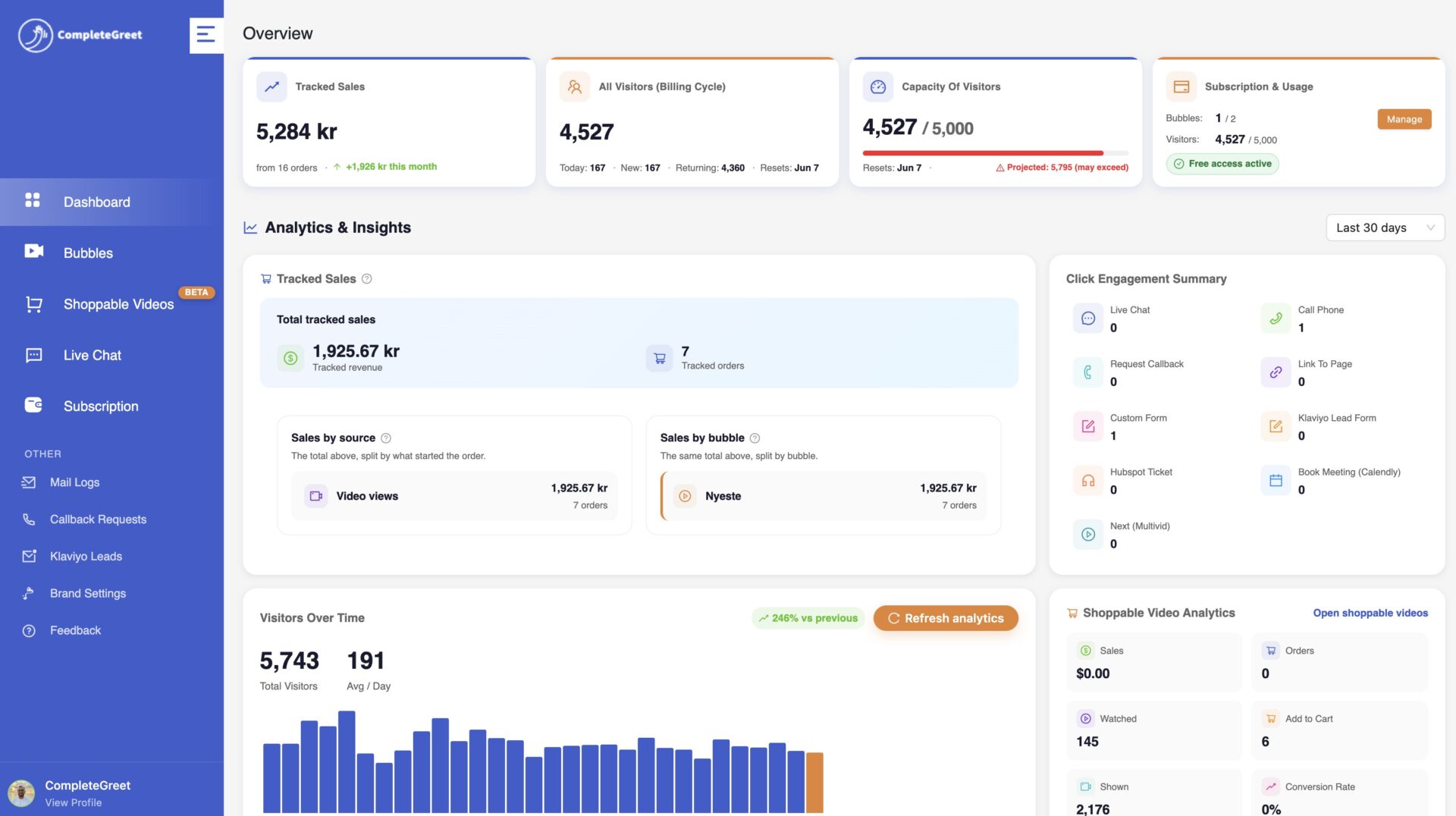
CompleteGreet includes basic click and view tracking in every plan. Teams can see which videos drive action without wiring up external analytics.
Results will vary with traffic quality, video placement, the offer, and where the button inside the widget leads. Placement matters.
A video buried three pages deep will not perform like one on the pricing page. Teams that want the examples by industry can read the CompleteGreet case studies for the published results.
Subscription box brands depend on recurring revenue, so visitors need to understand the offer before committing to a monthly plan. A video widget can put a face to the brand while explaining what the subscription includes.
The practical inputs are cost, placement, and the clips a brand can produce consistently.
Cost variables for one storefront
CompleteGreet BUILD lists at $29 per month when billed yearly, or $36 month to month, covering 5,000 unique visitors and 2 video bubbles on one site. That plan can fit a store whose monthly visitor count stays within the plan limit. Scaling to 10,000 visitors moves the brand into the GROWTH tier at $59 per month on yearly billing.
Brands should match the plan ceiling to their actual visitor count rather than paying for unused capacity. Choose a tier from the store’s actual unique visitor count and leave enough room for expected traffic spikes.
Placement priorities for subscription pages
Pricing and product pages are sensible starting points because they can answer questions about value, shipping schedules, and cancellation policies before checkout. Product detail pages benefit from a clip that shows the unboxing experience or the curation process behind each box. A third option is the pricing page, where a personal greeting reduces hesitation before a visitor selects a plan length.
A homepage bubble serves a different role by welcoming first time visitors and steering them toward a quiz or category page. This early touchpoint sets expectations for the human tone the brand will maintain throughout the customer journey. Clips should stay under 45 seconds on entry pages and under 20 seconds on checkout flows to avoid distraction.
Any third party widget adds JavaScript, so brands with strict speed budgets should test the real page against Google Web Vitals guidance before and after launch. Lazy loading and compressed thumbnails can reduce the initial load.
For a subscription box brand with fewer than 5,000 unique visitors a month, the BUILD plan stays within the published visitor limit. At the current yearly billing rate, the plan costs $348 for 12 months.
The real constraint is usually content production, not platform cost. A subscription box brand can start with two clips and add more once response data shows which page drives the highest watch rate. A practical starting point is a 30 second welcome clip and a 15 second unboxing preview. Short clips respect the visitor’s time and are easier for the brand to update when the box changes.
Common questions
How much does CompleteGreet cost for a new subscription box brand?
CompleteGreet BUILD is $29 per month when billed yearly, or $36 month to month, for 5,000 unique visitors per month, 1 website, and 2 bubbles or videos. That covers a site with no more than 5,000 unique visitors per month. A 30 day free trial with no credit card required lets brands test the widget before committing.
How quickly can a subscription box brand set up a CompleteGreet video widget?
CompleteGreet supports Shopify, WordPress, Wix, Squarespace, Webflow, WooCommerce, and custom HTML. The platform includes a dedicated onboarding session that walks founders through recording their greeting and choosing where it appears. The dedicated Shopify app simplifies installation, while other platforms can use the provided script or plugin.
What results have businesses measured after adding a video widget?
CompleteGreet’s public case page reports 70% customer engagement and a 17% conversion lift for one ecommerce business, while another reports 43% customer engagement and a 19% conversion lift. A hair salon case reports 42% more calls and bookings and 33% more time on site. These individual results are useful examples, not subscription box benchmarks or guaranteed outcomes.
Which pages on a subscription box website should use a video widget?
Pricing and product pages are useful places to answer questions before a visitor starts checkout. A founder greeting on the homepage also helps first time visitors understand the brand story before they browse. Some brands add a second bubble to a quiz or build your box page to guide selection and reduce decision fatigue.
Does CompleteGreet charge extra if a subscriber replays the video multiple times?
CompleteGreet bills by unique visitors per month, not by video plays or minutes watched. A subscriber who replays a greeting 10 times still counts as one visitor. This pricing based on visitors keeps costs predictable for subscription box brands with highly engaged audiences and eliminates any surprise overage fees at the end of the month.
Can a subscription box brand show different videos to new visitors and existing subscribers?
CompleteGreet lets users show bubbles on specific URLs, so brands can target new visitors on the homepage with a founder intro and returning subscribers on an account page with a loyalty message. The BUILD plan includes 2 bubbles or videos. This targeting keeps messaging relevant without overwhelming repeat visitors who already know the brand story.
Is CompleteGreet built for collecting post purchase feedback or subscription surveys?
CompleteGreet is built for trust and greetings, not for survey workflows. Brands that need complex post purchase questionnaires or net promoter score collection will still need a dedicated form tool. For explaining cancellation terms and putting a face to the brand on pricing pages, a video widget can be a useful fit.