Profile
 Dashboard
 Logout
Table of contents
What to know
- CompleteGreet publishes six customer cases with separate engagement, conversion, time on site, and call or booking results. They are not controlled response time studies.
- The current CompleteGreet embed uses the async attribute, so downloading it does not pause HTML parsing. You should still test the page before and after installation.
- Recording the video, choosing the placement, and deciding what to measure can take longer than the installation and often matter more to the result.
What does the research say about response time?
CompleteGreet currently publishes six customer cases. Five report customer engagement increases from 43% to 70%. Separate cases report time on site increases from 21% to 33%, conversion lifts of 17% and 19%, and 42% more calls or bookings. These are individual case results, not a combined average or a controlled response time test.

Those case results show what the businesses reported after using CompleteGreet, but they do not isolate response speed. Separate lead response research is more useful for that question.
Harvard Business Review reported in 2011 on a study of 1.25 million sales leads. Companies that tried to contact a potential customer within an hour were nearly seven times as likely to qualify the lead as companies that waited even one hour longer, and more than 60 times as likely as companies that waited 24 hours or more.
Why a quick response helps
A lead that just filled out a form has shown active interest. A long delay gives them time to contact another business or move on to something else.
Set an alert so the first response happens in minutes rather than hours. If your team can answer quickly, offer a phone, chat, or booking action while the visitor is still on the page. The HBR study supports responding within an hour, but it does not establish one universal five minute deadline for every business.
The published CompleteGreet cases report results after adding a video greeting, but they do not compare different follow up times. Treat those figures as examples, not as a guarantee for your own site.
CompleteGreet widgets can include call, chat, form, and booking buttons. That gives the visitor a clear next step without making them search for a separate contact page.
Does the widget actually affect page speed scores?
The current CompleteGreet embed uses the async attribute. This means the browser can keep parsing the page while it downloads the script. It reduces one common source of delay, but it does not guarantee an unchanged PageSpeed score.

The video file matters too. CompleteGreet compresses uploads, but the final file size depends on the source video and its settings. Keep the greeting short and test the real page instead of relying on a fixed file size estimate.

CompleteGreet says the page renders first and the video experience loads carefully afterward. The exact impact still depends on the page, the device, the network, and any other scripts already running.
The bubble position can be adjusted for desktop and mobile. Check both layouts to make sure it does not cover navigation, consent controls, or important buttons.
What to check if your score drops
First, confirm that the embed still includes the async attribute and that a performance plugin has not changed how it loads. Then test the same page before and after installation under the same conditions.
Google’s Web Vitals guidance covers loading, interactivity, and visual stability through LCP, INP, and CLS. Any third party script should be measured against those metrics on the actual page.
Because the script loads async, the bubble may appear just after the main page content. That is usually preferable to delaying the page itself.
If the score drops after installation, confirm the embed is still async and compare the same URL more than once. Third party code can affect performance, so the result should be measured rather than assumed.
How to set up your first video greeting in under 5 minutes
The installation is usually the quick part. Recording the video, choosing the placement, and deciding what to measure can take longer and often matter more to the result.
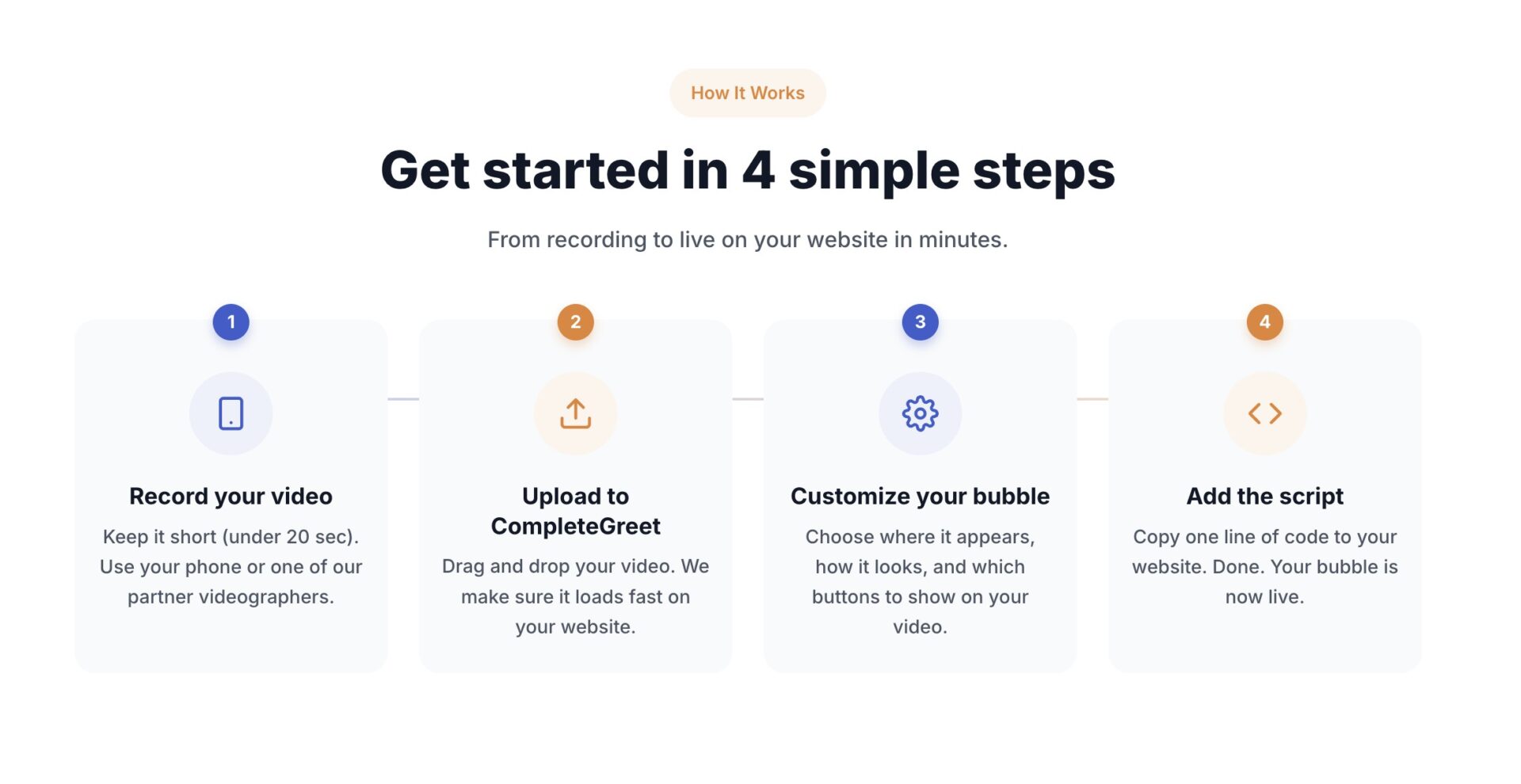
The basic flow has four steps: record, upload, customize, and add CompleteGreet to the site. Shopify has a dedicated app, WordPress and WooCommerce have a plugin, and other sites can use the async embed. A first setup usually takes a few minutes, although recording and reviewing the video can take longer.
What to say in the greeting
CompleteGreet currently recommends keeping the greeting under 20 seconds. Nielsen Norman Group advises starting strongly, removing unnecessary introductions, and making videos as concise as possible. Get to the visitor’s question quickly.
Script it like a voicemail for a busy person. Name, role, the one problem the visitor came to solve, and a single next step. That’s the whole script. Point to the button instead of describing it.
A phone camera is enough for a simple greeting. Face a window, put the lens at eye level, and test the sound before uploading.
Where to place the bubble
Bottom right is a common starting point. Check that the bubble clears the mobile menu and any important button on a phone screen.
Start on a page where visitors are likely to need reassurance or a clear next step, such as pricing, contact, or a product page. CompleteGreet page targeting lets you show the greeting on selected URLs instead of every page.
How to measure results
The dashboard tracks views, opens, clicks, chats, forms, bookings, and tracked conversions. Watch what visitors do after opening the video, not only how often the bubble appears. If people watch but do not act, test the message and the next step.
Give the test enough time to collect a useful sample, then compare the same pages and time periods. The CompleteGreet case studies offer examples from real sites, but they do not set a benchmark for every business.
A 30 day free trial covers the first test period.
Review the greeting when the offer, page, or visitor questions change. Keep each version under 20 seconds, then use the dashboard to decide whether the message needs another test.
Common questions
How fast should my business respond to website leads to actually win the sale?
Respond as soon as your team can give a useful answer. Harvard Business Review reported that firms trying within an hour were nearly seven times as likely to qualify a lead as firms that waited even one hour longer, and more than 60 times as likely as firms that waited at least 24 hours. The study supports acting quickly, but it does not create one universal deadline for every business.
Does speed to lead matter for a small local business, or is that only for big sales teams?
It matters for small teams because every lead counts. A missed callback can send a visitor to a competitor who answers sooner. CompleteGreet’s case page says frisor-sadon.dk reported 42% more calls or bookings, but that case does not isolate response speed as the cause.
Will adding a video greeting to my website slow it down or hurt my page speed score?
The async attribute lets the browser continue parsing the page while the script downloads, but it does not guarantee zero impact. Check that the CompleteGreet embed remains async, then compare the same page before and after installation with PageSpeed Insights.
What should the first reply to a new website lead say when I’m racing to respond fast?
Answer the question the visitor asked, then offer a clear next step. A short reply that names their request and offers a time to talk is usually more useful than a polished pitch. A video greeting can make the follow up conversation feel less like a cold introduction.
Is it better to send an automated instant reply or wait for a human to respond to website leads?
An automated reply can confirm that the message arrived, but it cannot answer a specific question unless the workflow has the right context. Use automation to acknowledge the lead and route it quickly, then let a person handle the real conversation when needed.
Can I set up a video greeting myself without a developer, and how long does it take?
A first CompleteGreet setup usually takes a few minutes once the video is ready. Record and upload the video, customize the bubble, then use the app, plugin, or async embed for your site. BUILD is currently $29 per month when billed yearly, or $36 month to month, for 5,000 unique visitors per month, one website, and two bubbles or videos. The 30 day trial needs no credit card.