Profile
 Dashboard
 Logout
Table of contents
What to focus on
- Use a short video on the launch page to show the product and point shoppers to the next step.
- A launch can bring a sudden traffic spike. Keep the video short, page specific, and easy to measure.
- Record the video, upload it, customize the Bubble, and add the script to your site.
How to Use Video to Sell Out a Product Launch
The video should support the launch page, not replace it. Use it to demonstrate the product and make the next step clear.

CompleteGreet currently lists six customer cases with different measures, including engagement, time on site, conversions, and bookings. They are not product launch experiments.
Two ecommerce cases report conversion lifts of 17% and 19%, while a hair salon reports 42% more calls or bookings. The case page does not link those results to video length, production style, or placement.
What the video should say
A launch page still needs clear copy. A short greeting can support it by showing the product, naming the main problem it solves, and pointing to the buy button.
A simple script is enough. Long feature lists and extra animation can bury the main message.
Keep the greeting to one promise. Name the product, show it working, and make the price easy to find when it is central to the decision.
CompleteGreet’s current homepage recommends keeping a video greeting under 20 seconds. Put a longer product demo lower on the page if the product needs more explanation.
Where to place it and what to test
A corner Bubble stays available while visitors browse without forcing them to watch.
Use it to answer the main question people have on the launch page.
Use page targeting to show the greeting on the launch or product URL. CompleteGreet also supports scheduling, so test the timing with your own visitors.
A fullscreen popup is another option for launch day. CompleteGreet can show it once per visit or on a chosen trigger, with a product card and buy button beside the video.
Keep the popup focused on one message and one action.
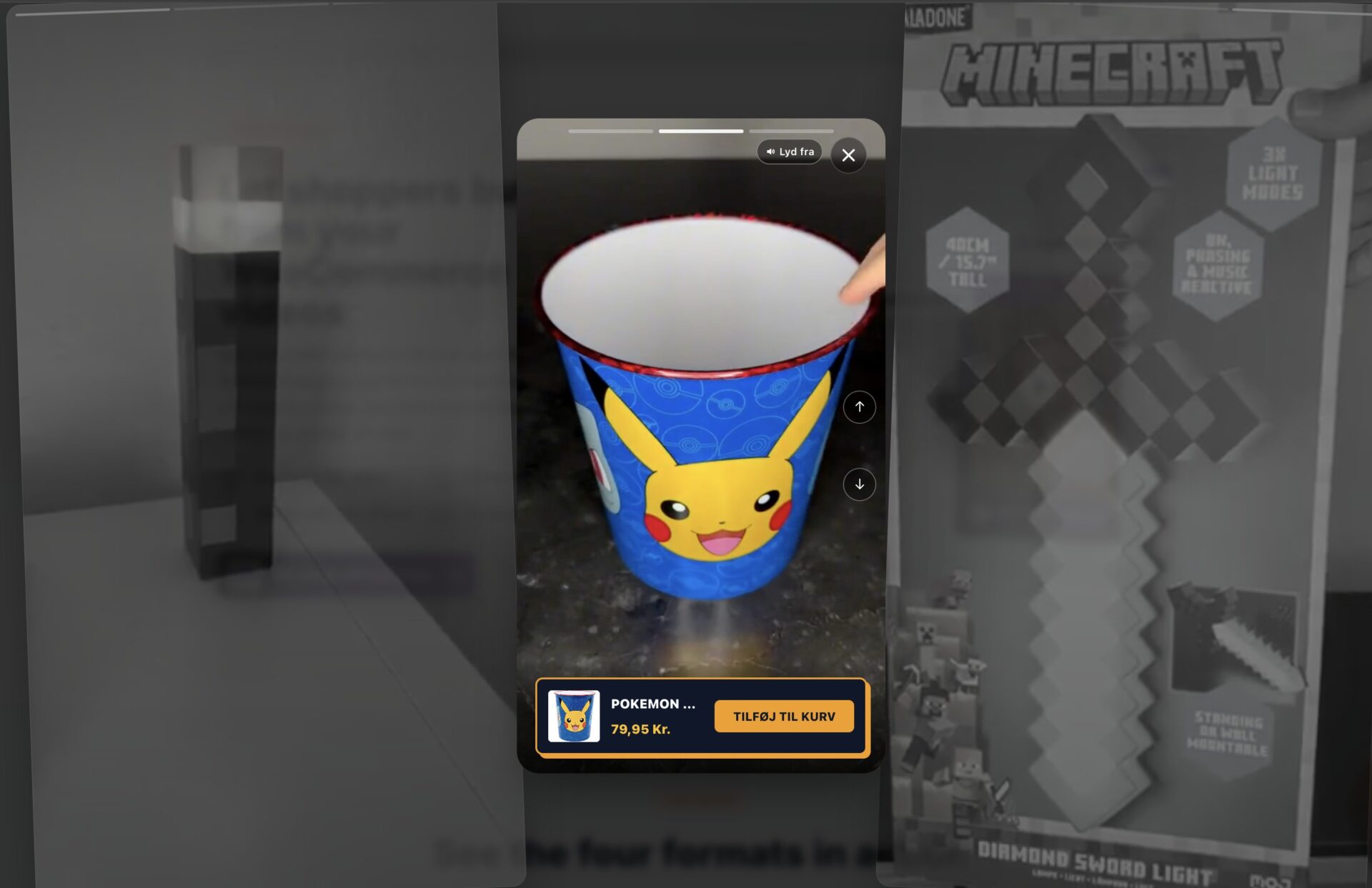
CompleteGreet plans are based on monthly unique visitors. BUILD includes 5,000 unique visitors, one website, and two Bubbles or videos, so check expected launch traffic against your plan before going live.
A clear smartphone video can work well. Record in a quiet room, check that your face is easy to see on a phone, and add captions for people watching without sound.
Keep the launch video on the product or launch page and avoid adding friction to checkout. The published 17% case result does not identify a checkout placement.
Why video can help on a launch page
Launch traffic can arrive in a short burst. Test the message and tracking before the campaign starts.

Five published cases report customer engagement gains from 43% to 70%. Four report time on site gains from 21% to 33%. These are separate customer results, not a combined average or a controlled launch study.
Use those figures as examples, not as a forecast for a new launch.
A launch can combine ad spend, creative production, email, and partner activity. A clearer page may help more visitors take the next step, but video alone cannot guarantee the result.
A short demo can answer a product question in the same session. Measure whether viewers click or buy instead of assuming the video shortened the sales cycle.
Some launch traffic arrives from ads and social posts. A short video from the founder or product lead can explain what the product is, show it working, and tell visitors what to do next.
CompleteGreet’s published plans use monthly unique visitor limits. Pick a plan that fits the traffic you expect during the launch.
Add the video early enough to test the message, page targeting, and next step before launch day.
How to set up your first video greeting
CompleteGreet presents setup as four steps: record the video, upload it, customize the Bubble, and add the script to your site. Plan the message before you open the dashboard.
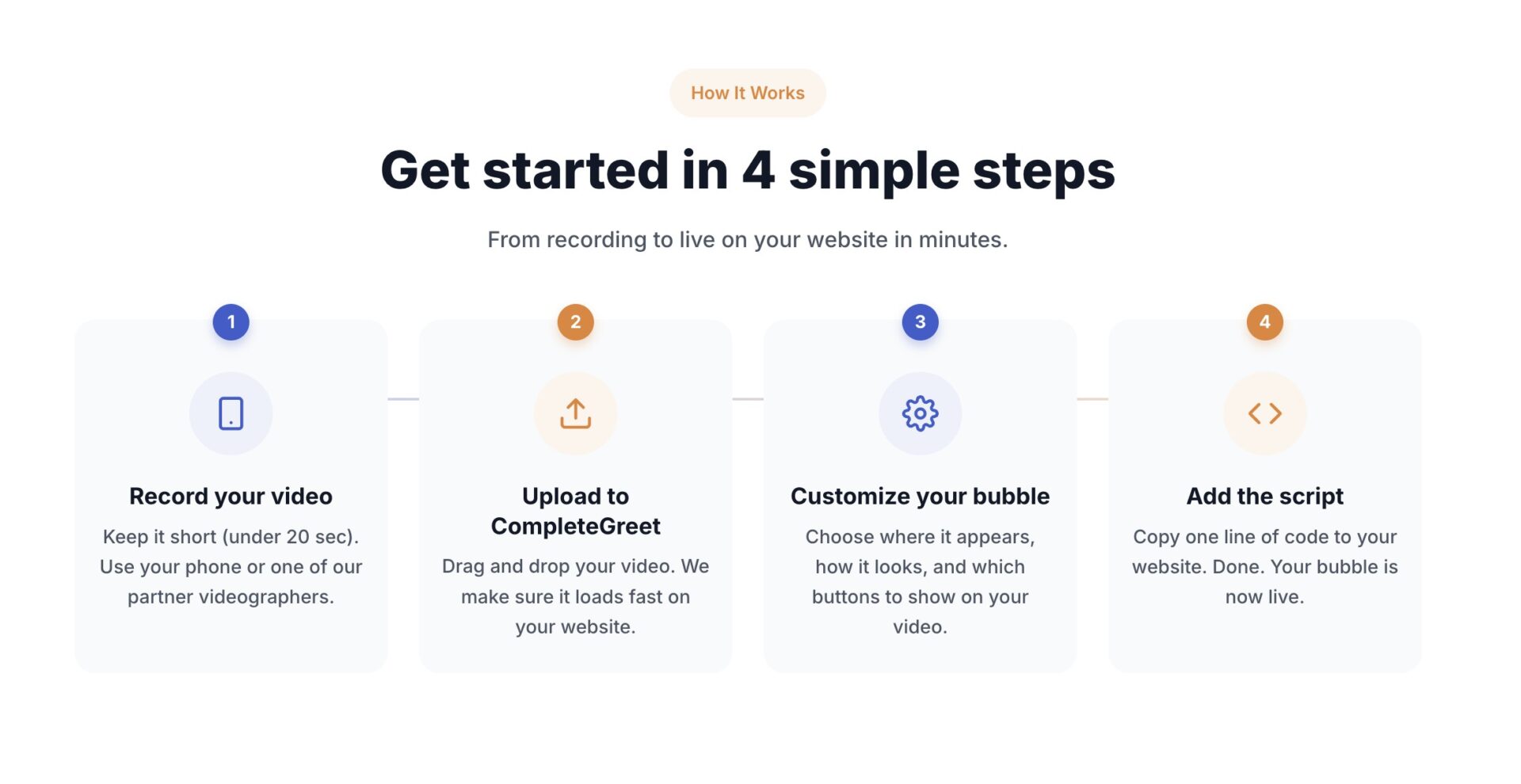
Start with the message, not the camera. Keep the greeting focused on the main question a visitor has on that page.
Aim for a clip under 20 seconds, in line with CompleteGreet’s current homepage guidance.
What to say in a short greeting
Three short sentences can be enough. Open with your name and role, name the one thing this page helps with, and tell the visitor what to click next.
Write a short outline before you record so the main point does not get buried.
Record with the camera at eye level and a window in front of you, not behind. Check the framing on a phone so your face stays clear on a small screen.
Where to place it and how to measure it
Put the Bubble on pages where a decision happens: the homepage, the pricing page, and for a launch, the product page itself. Use page targeting and scheduling to control where and when it appears.
Don’t put it on the checkout page.
CompleteGreet analytics can show views, opens, clicks, chats, forms, bookings, and tracked conversions. A high view count with few actions is a reason to test both the message and placement, not proof that only one is wrong.
CompleteGreet’s published cases report different measures and should not be treated as one average. See the case studies for the current figures. The overview does not document a product launch test or prove one placement works best.
Record a new version if the delivery sounds scripted. Keep the version that produces clearer actions in your own data.
Use this checklist as a starting point, then test the result on your own launch page.
What to include in your launch video
- Show the product in use early in the clip.
- Answer the main question buyers have before purchase.
- Keep the clip under 20 seconds.
- End with a specific action, like preordering or joining a waitlist.
Use page targeting to keep the greeting on the relevant launch pages. Google recommends a Largest Contentful Paint of 2.5 seconds or less at the 75th percentile, so measure the live page before and after adding the video.
CompleteGreet’s current setup flow is record, upload, customize, and add the site script. Use its analytics to follow views, opens, clicks, and tracked conversions.
Use CompleteGreet’s Bubble video A/B test when possible, and compare tracked conversions rather than treating a simple before and after change as proof.
Common questions
How long should my product launch video be to actually convert visitors into buyers?
Keep the greeting under 20 seconds, which is CompleteGreet’s current homepage guidance. Show the product quickly, state the main benefit, and give one next step. Put a longer demo lower on the page if the product needs more explanation.
Will adding a video greeting slow down my launch page and hurt conversion?
CompleteGreet compresses uploaded videos and lets the page render before its script runs. That reduces the risk, but no third party widget can promise a page speed score. Check the live page and aim for a Largest Contentful Paint of 2.5 seconds or less at the 75th percentile.
Where should I place the launch video on the page for the best results?
There is no single placement that works best for every launch. Start with a Bubble on the product or launch URL, keep the buy button visible, use an A/B test for the message, and test placement separately.
What should I say in a short launch video?
Open with the result the product delivers, show how it solves the problem, and say what to do next. Keep the proof specific, such as a verified number or customer quote, and fit the greeting into the recommended 20 seconds.
How do I know if the video actually helped sell out the launch?
Use CompleteGreet’s A/B test and tracked conversions instead of relying on views or a simple before and after comparison. The published customer cases are separate examples, not a benchmark for product launches.
What does it cost to add video greetings to a product launch page?
CompleteGreet BUILD is $29 per month when billed yearly, or $36 month to month, for 5,000 unique visitors per month, one website, and two Bubbles or videos. The free trial lasts 30 days, requires no credit card, and ends automatically.
Can I reuse my launch video greeting for the next product drop?
You can reuse the structure, but update the product, hook, proof, and call to action for the new launch. Compare the new version with the old one if you want to know which performs better.
Does a video greeting work for every kind of product launch?
A video greeting is a good fit when a visible person can explain or demonstrate the product. Keep the Bubble short and place a longer demo in the main page content when buyers need more detail.